
Best Digital Planners and What Still Costs You After You Buy
As an Amazon Associate I earn from qualifying purchases. Some links may earn us a commission at no extra cost to you.
Two different things go by this name. One is a downloadable file you write on in a tablet app, which is a template rather than a product. The other is a wall-mounted touchscreen that syncs your calendars and runs the household, and that is what this page covers. There is a catch worth knowing before you gift one. Several listings in this category advertise “no subscription fees” as a headline feature, which tells you plainly what the default is elsewhere: the market leader keeps some functions behind an annual charge. These are also cloud devices, so they depend on the maker’s servers staying up to keep syncing. I score them on subscription independence, meaning how much of what you paid for keeps working without paying again.
Top picks
Skylight Calendar 15 inch — Best known, with an annual charge attached
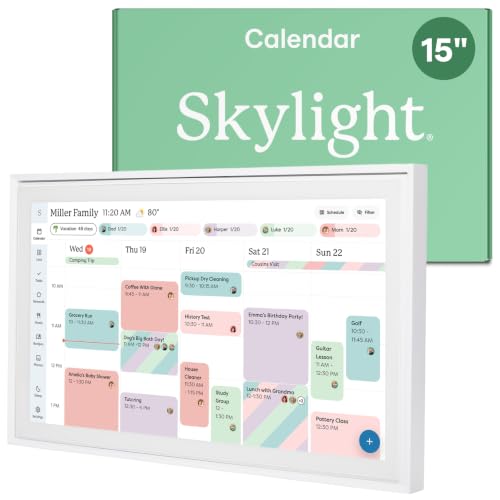
- THE ULTIMATE DIGITAL CALENDAR: Meet Skylight’s 15.4” touchscreen wall planner—a premium hub built for busy families. This central display combines shared schedules with an interactive digital chore chart to seamlessly keep everyone in sync. Assign colors, add events, and bring order to a frantic routine, all designed for 2026 and beyond.
- EVERYTHING AT A GLANCE WITH SEAMLESS SYNCING: This electronic calendar connects to Wi-Fi in minutes and syncs effortlessly with Google, iCloud, Outlook, Cozi, and Yahoo. It keeps daily schedules and family events perfectly readable at a glance, allowing anyone to add updates directly on the device or via the app.
- CUSTOMIZABLE DESIGN: Features a sleek, HD smart display that mounts easily to any wall or sits beautifully on a kitchen countertop, hallway table, or home office desk. Whether used as a standalone display or a permanent electronic wall calendar, it fits naturally into your layout and your family's daily spaces.
Why it wins: The category leader, with the largest review base and the most polished calendar syncing, and the one most likely to be set up correctly on the first evening. Be clear on the pricing: calendar sync, the shared family view, basic chore charts and lists all work without paying anything further. A paid annual tier, Skylight Plus, is what unlocks meal planning, the photo screensaver, chore rewards and the feature that turns a photographed school newsletter into calendar entries.
Pros
- The core calendar works fully without a subscription
- Much the largest review base in this category
- Wall mount included, and the setup is genuinely simple
- Best-supported calendar syncing here
Cons
- Meal planning and chore rewards sit behind a yearly subscription
- Costs more up front than similarly sized rivals
- Gifting one may mean gifting a recurring bill
- The photo screensaver, which sounds like a basic feature, is paid
Social proof: See rating and reviews on Amazon.
Trade-offs and who should skip: You are buying the most reliable software and being upsold on the rest. Skip it if the person receiving it would resent a yearly renewal. Skip it if meal planning was the reason you were buying at all, because that is the paid tier.
Scores: Performance 5/5 | Subscription independence 3/5 | Ease of use 5/5 | Value 3/5
Apolosign 21.5 inch — Best large screen
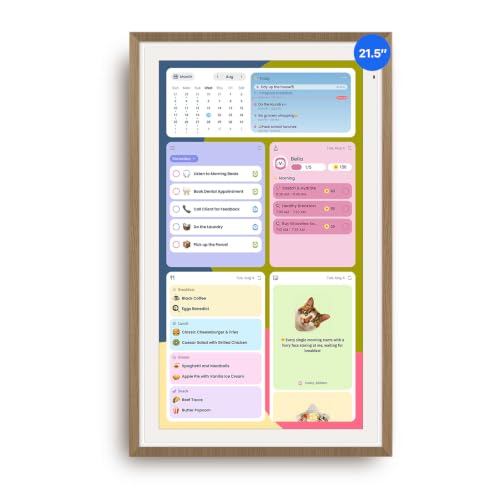
- Smart Family Smart Calendar– No Subscription Required: Keep your entire family organized in one place with the Apolosign Digital Calendar & Smart Wall Planner. Sync schedules, events, chores, reminders, and shared calendars from Google Calendar, iCloud, Outlook, and more. Designed to bring daily family life into better organization — all without any monthly subscription fees.
- Dual Mode: Calendar & Android: Switch easily between Calendar Mode for simple family scheduling, and Android Mode for a fully customizable dashboard. One touch lets you personalize your screen with apps and widgets or keep it clean and focused.
- Interactive Chore Chart, Routine & Family Planner: Make daily routines easier and more engaging with reward-based chore tracking. Help kids stay motivated by completing tasks, building habits, and earning rewards. Families can manage grocery lists, shopping lists, wish lists, and weekly meal planning all in one shared digital space through the Apolosign Calendar App.
Why it wins: At 21.5 inches this is big enough to read a week at a glance from across a kitchen, which is the actual job. It also installs apps and widgets rather than locking you to one interface, so it behaves more like a device you own than an appliance you rent.
Pros
- Largest practical screen here without going to the premium tier
- Installs apps and widgets rather than a fixed interface
- Highest average rating in this roundup
- Wall mount included
Cons
- Costs the most on this page
- A screen this size needs a real wall and a power outlet near it
- Smaller review base than Skylight
Social proof: See rating and reviews on Amazon.
Trade-offs and who should skip: Size buys legibility and costs placement flexibility. Skip it if the spot you have in mind is a worktop rather than a wall. Skip it if you want the most proven software.
Scores: Performance 4/5 | Subscription independence 4/5 | Ease of use 4/5 | Value 4/5
15.6 inch Sync Calendar with No Subscription — Best no-fee option
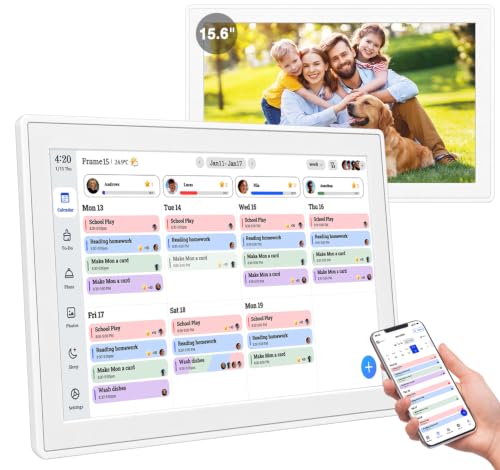
- 【Family Command Center & Digital Calendar】 Transform your home with this batteries not included digital calendar wall touch screen that goes beyond simple scheduling. It seamlessly integrates family calendars, meal planning, and chore charts in one sleek 15.6 digital calendar, creating a comprehensive family command center that brings household organization and whole-family coordination together in one place.
- 【Real-Time Sync & No Subscription Fees】Enjoy the freedom of a smart calendar with no monthly subscription fees for essential calendar features. Our electronic calendar syncs in real-time with Google, Outlook, iCloud, and other platforms, allowing multiple family members to edit schedules simultaneously. This subscription-less model ensures your family planner stays perfectly coordinated.
- 【Motivational Chore & Reward System for Kids】Foster responsibility and good habits with the built-in digital chore chart. Parents can assign tasks, and children love checking them off to earn reward points. This interactive family chore chart turns daily routines into a fun, gamified experience, ideal for busy families.
Why it wins: Real-time Google, Outlook and iCloud syncing with no subscription attached, which is the whole argument. If the paid features on the market leader are what you actually wanted, buying a device that includes them outright costs less over any reasonable ownership period.
Pros
- Syncs the three calendar systems most households use
- Meal planning and chore charts included rather than upsold
- Costs less than the Skylight before the subscription is counted
Cons
- A generic brand with no track record if something breaks
- Far fewer reviews than the established names
- No-subscription today is a promise, not a guarantee
Social proof: See rating and reviews on Amazon.
Trade-offs and who should skip: You trade brand reliability for included features. Skip it if you want a company likely to still be supporting the device in five years. Skip it as a gift for someone who would struggle without good support.
Scores: Performance 4/5 | Subscription independence 5/5 | Ease of use 4/5 | Value 5/5
Dragon Touch 15.6 inch — Best value
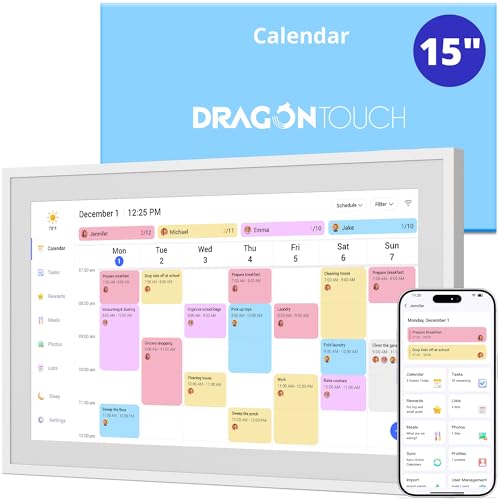
- 【Real-Time Sync, Zero Subscription Fee】: This Dragon Touch smart calendar syncs instantly with Google Calendar, Outlook, and iCloud — every schedule update appears on the 15.6" FHD touchscreen within seconds. No monthly fees, no subscriptions, ever. All core features are free for life.
- 【All-In-One Family Command Center】: Replace the messy fridge paper calendar with one organized screen. Color-code each family member, view everyone's schedules side by side, and end the "who's picking up the kids?" confusion — perfect for busy households of 2 to 10 members.
- 【Motivating Chore Chart for Kids】: Turn chores into a game. Assign tasks, check them off on the interactive touchscreen, and watch kids build healthy habits with visual to-do lists. Also includes a dinner planner to end the daily "What's for dinner?" question.
Why it wins: The same 15.6 inch size as the mid-range options at roughly half the price of the market leader, from a brand with a long history in photo frames and tablets rather than a name that appeared last year. For a gift where the recipient may or may not take to the idea, that price gap matters.
Pros
- Around half the price of the leading 15 inch option
- An established brand rather than an unknown
- Wall and desk mountable, so placement is flexible
- Doubles as a photo display when not in use
Cons
- Software is less refined than Skylight’s
- Fewer reviews than its sales volume suggests
- 1080p on a 15.6 inch panel looks coarser up close
Social proof: See rating and reviews on Amazon.
Trade-offs and who should skip: This is the sensible gift when you are not certain it will be used. Skip it if the recipient is already committed to running the household this way. Skip it if software polish is what you are paying for.
Scores: Performance 4/5 | Subscription independence 4/5 | Ease of use 4/5 | Value 5/5
10.1 inch Smart Calendar — Cheapest way in
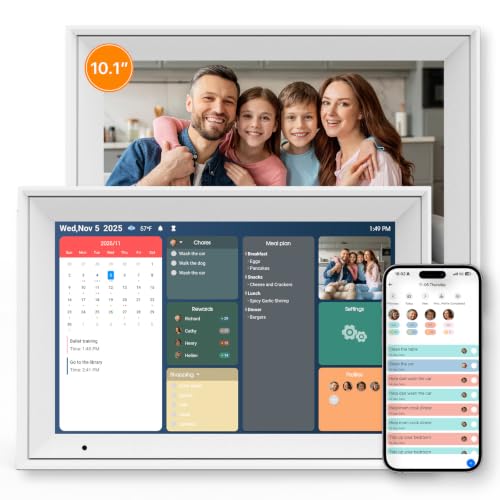
- All-in-one Smart Calendar: Smart interactive digital calendar combines calendar, digital picture frame, chore chart and task management into one family command center. This 10.1-inch digital calendar syncs seamlessly with smart phone calendar app to organize schedules for all family members with color-coded labels and real-time reminders on one centralized screen, eliminating paper clutter.
- Chore Chart & Reward System: Our electronic calendar makes chore management simple and rewarding. Assign tasks with automated reminders so nobody misses their turn. Color-code each family member for instant task recognition. The visual system makes family coordination effortless. Earn points for completed chores to unlock rewards everyone gets excited about. Turn responsibilities into shared wins with a playful system that motivates your whole family!
- Easy Setup and Multi-calendar Sync: Power on your digital calendar and connect to WiFi, sync with your favorite calendar apps. Enjoy seamless two-way synchronization with Google Calendar and Outlook Calendar. Users of calendar applications such as iCloud, Cozi, and Yahoo can sync their schedules via a URL link. After turning on your digital calendar for the first time, we strongly recommend upgrading the system directly to the latest version (calendar version 4.0.0) to ensure optimal data synchronization with your calendar app.
Why it wins: A fraction of the price of the large wall displays, small enough to sit on a desk or a kitchen shelf, and with 32GB built in it works as a photo frame when nobody is looking at the schedule. This is the one to buy if you want to find out whether the idea suits someone before spending properly.
Pros
- The cheapest entry point here by a wide margin
- Small enough for a desk or shelf rather than needing wall space
- Decent review base for a budget device
Cons
- 10.1 inches is too small to read a family week from across a room
- Lower resolution than the larger displays
- Touch response on budget panels is slower
- Generic branding, so support is a question mark
Social proof: See rating and reviews on Amazon.
Trade-offs and who should skip: Small and cheap is a test purchase, not a household command centre. Skip it if more than two people need to read it. Skip it if it will be mounted on a kitchen wall, where the size defeats the purpose.
Scores: Performance 3/5 | Subscription independence 4/5 | Ease of use 4/5 | Value 5/5
Quick compare
- Best known: Skylight Calendar 15 inch, core works free, a yearly subscription for the rest
- Biggest screen: Apolosign 21.5 inch, priciest and needs wall space
- No ongoing fees: 15.6 inch sync calendar, generic brand
- Best value: Dragon Touch 15.6 inch, less polished software
- Cheapest: 10.1 inch smart calendar, too small for a family wall
One thing to weigh when gifting any of these. They are screens that depend on a company’s servers to keep syncing calendars, so their useful life is tied to that company continuing to support them. A paper planner has no such dependency, which is not an argument against buying one, only a reason to prefer established names.
As an Amazon Associate, I earn from qualifying purchases.